This post first appeared on OracleAppsBlog in June 2004. It explains constraints in Oracle Public Sector Budgeting (PSB) in E-Business Suite 11i, not Oracle Cloud. More posts from that period are in Oracle Financials.
The Oracle Public Sector Budgeting User’s Guide describes constraints as a way to “notify users regarding specific conditions for account ranges, elements, or position sets”. Oracle PSB has three kinds:
- Account constraints prevent budget amount violations for line items.
- Element constraints prevent changes to element rates for a selected group of positions.
- Position constraints prevent element cost violations for selected positions, or for positions assigned to invalid element options.
In most of the government organisations I have implemented in, constraints are known as ceilings. They place limits on budget estimates. In Oracle PSB, you prepare estimates in budget worksheets, and the system then checks them against the ceilings that the relevant authorities have set.
The screenshot below shows the constraint setup screen in Oracle PSB.
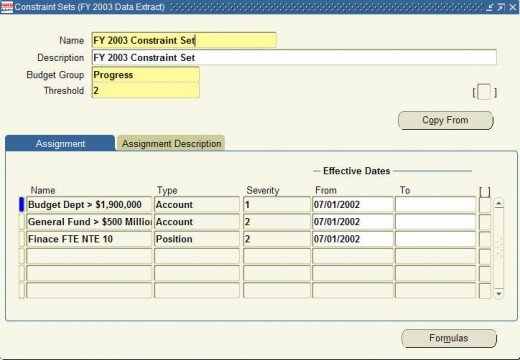
Severity levels and thresholds in Oracle PSB constraints
One of the concepts I struggled to understand was how severity levels and thresholds work together. I felt the Oracle documentation was weak in this area and didn’t define it clearly. So in the next few paragraphs I will try to explain how these two settings work. Essentially, there are two types of ceiling.
Hard ceilings (also called absolute)
A ceiling is hard if the threshold is less than or equal to the severity level. In the screenshot, lines two (“General Fund”) and three (“Finance FTE”) are hard ceilings.
When a preparer submits a budget worksheet for review against a hard ceiling, PSB produces a constraint violation. The preparer must then correct the worksheet and submit it again. In other words, the worksheet stays with the preparer until they fix the violation.
Soft ceilings (also called advisory)
A ceiling is soft if the threshold is greater than the severity level. In the screenshot, line one (“Budget Dept”) is a soft ceiling.
In this case, PSB still produces a constraint violation when the preparer submits the worksheet. However, the authoriser can carry on working on it and post it to the General Ledger. The violation shows as a warning, but it doesn’t stop the worksheet going through the remaining steps to the General Ledger.
Note: if you leave the severity level blank, PSB treats it as less than the threshold, so the ceiling is soft. That’s the main rule to remember when you set up Oracle PSB constraints: compare the threshold with the severity level to know whether a ceiling will stop a worksheet or only warn.
It’s important to note that only constraints tied to the global constraint set identified when defining the worksheet are checked when submitting a worksheet. Constraints included in a local constraint set (i.e. one which is tied to a budget group) are only check when running the Validate Worksheet Constraints operation. The same constraints can and should be included in the global constraint set and the local constraint sets.